
Best Mouse for Students in 2026
Finding the Best Mouse for Students in 2026 is a big deal because students spend more time on computers than ever before. Whether you are watching online classes, typing up assignments, doing research, coding, or making presentations, a good mouse makes your work much faster and easier.
Many students use their laptop’s built-in touchpad every day. However, touchpads can make your wrist ache during long study sessions. That is why upgrading to a separate mouse can make your daily school or college life a lot more comfortable.
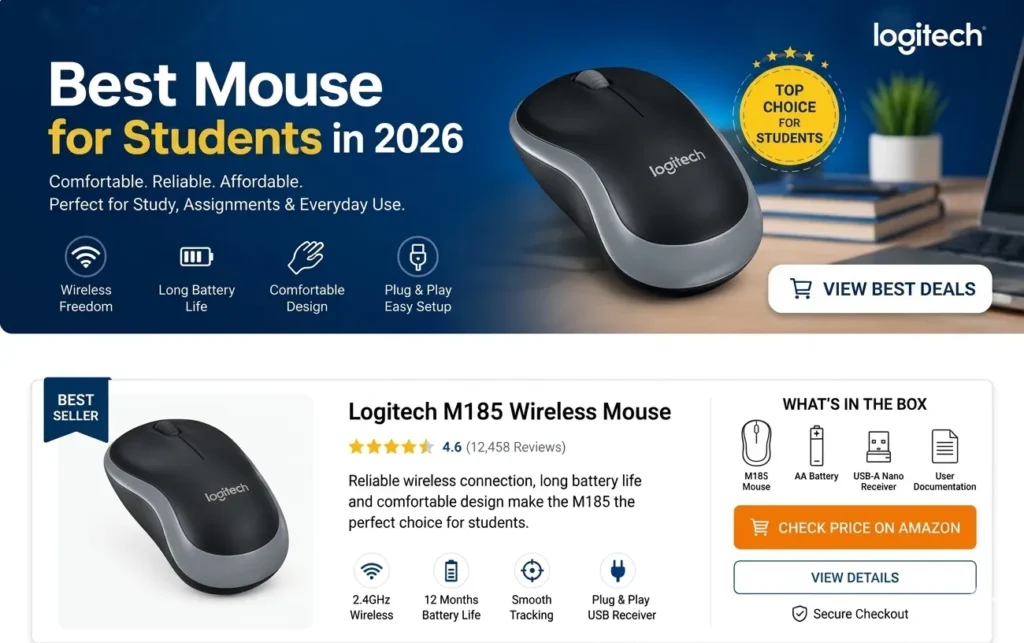
Among all the choices available today, the Logitech M185 Wireless Mouse is still one of the most popular and trusted choices for students. It gives you a strong wireless connection, long battery life, a comfortable shape, and a very low price.
If you want a simple, reliable mouse that just works, the M185 is a fantastic choice. If you want to see how it compares to mice made for heavy office work, you can also read our guide on the Best Wireless Mouse for Work and Study.
❓ Why a Good Student Mouse Matters
Technology is now a huge part of school and college. Students regularly use their computers for:
Using an uncomfortable mouse can cause:
- 💻 Attending online classes and video lectures
- 📝 Writing assignments and essays
- 🔍 Researching projects on the web
- 👩💻 Learning how to code
- 🎨 Making slides and presentations
Using an uncomfortable mouse can cause wrist pain, slow down your speed, and make you frustrated during long study hours. Choosing the right mouse is not just about looks. It is about comfort, reliability, and making your student life easier. The Logitech M185 does all of this without costing a lot of money.
🔍 Logitech M185 – Quick Overview
The Logitech M185 is a small wireless mouse made for everyday tasks. Unlike expensive gaming mice that have too many confusing buttons, this mouse focuses on being simple and reliable. That is exactly what most students actually need.
It is a wonderful option for:
- 🏫 School and high school students
- 🏛️ College and university students
- 🏡 Online learners and remote students
🎨 Design and Comfort
🎒 Light and Easy to Carry
Portability is very important for students. Your backpack is already heavy with a laptop, textbooks, notebooks, and chargers. You do not want a heavy mouse adding to that weight.
The Logitech M185 is very lightweight and small. You can easily slide it into any small pocket of your bag. This makes it super easy to carry and use anywhere:
- 🏡 In your bedroom or dorm room
- 🏫 Inside classrooms and lecture halls
- 📚 In quiet libraries
- ☕ At your favorite coffee shop
🖐️ Comfortable Shape for Left and Right Handers
The Logitech M185 has a nice, natural curved shape that feels comfortable even if you use it for hours. Also, it has an ambidextrous design. This means it is shaped perfectly for both right-handed and left-handed users. A comfy mouse stops your hand from getting tired when you are working hard on late-night assignments.
📡 Easy Wireless Convenience
🔌 No Messy Wires
Wired mice can easily tangle up in your bag and make your study desk look messy. The M185 uses a tiny USB receiver that plugs into your laptop. It gives you a smooth, lag-free wireless connection, so you can move your mouse around freely.
⚡ True Plug-and-Play Setup
Students do not want to waste time installing heavy software or setting up drivers. The M185 setup takes just a few seconds:
- Plug the tiny USB receiver into your laptop.
- Turn on the switch at the bottom of the mouse.
- Start using it right away!
🔋 Battery Life – A Huge Advantage
There is nothing worse than your mouse dying right in the middle of an online exam or a live lecture. One of the main reasons people trust Logitech products is their excellent battery life.
The M185 runs on just one single AA battery, and it can last for up to 12 months depending on how much you use it. It also turns itself off automatically when you aren’t using it to save power. This saves you money and stops you from worrying about changing batteries all the time.
🚀 Performance for Everyday Study
🎯 Smooth Cursor Movement
The M185 moves smoothly and accurately on standard desks and mousepads. It works perfectly for all your daily student software, such as:
- 📄 Typing on Microsoft Word and Google Docs
- 📊 Working with numbers in Excel
- 🖼️ Creating slides in PowerPoint
- 👩💻 Writing code in programming applications
🤫 Soft and Quiet Clicks
If you study in quiet places like a library, a computer lab, or a shared room, loud clicking noises can be highly distracting to others. The M185 has soft, reasonably quiet clicks so you can focus on your work without disturbing anyone around you.
💻 Is the Logitech M185 Good for Your Major?
💼 Great for Business and Arts Students
If your studies mostly involve reading PDFs, writing reports, browsing websites, and managing files, this mouse is a perfect fit. It gives you all the comfort and portability you need at a very low cost.
👩💻 Good for Coding Students
Coding requires a lot of scrolling through lines of text and accurate clicking. The M185 handles general programming and web design tasks very well, making it a reliable tool for computer science beginners.
🎮 Can You Use It for Gaming?
⚖️ Wired vs. Wireless Mice for Students
The M185 is not a professional gaming mouse. It does not have extra gaming buttons or flashing lights. However, if you just want to play casual games like Minecraft or simple strategy games after finishing your homework, it works perfectly fine.
Friendly Advice: If your studies require heavy 3D design, professional video editing, or if you play fast-paced competitive games, you might want to look at advanced mice. You can check out more specialized options directly on the official websites of Logitech, HP, Dell, and Lenovo.
 Friendly Advice: If your studies require heavy 3D design, professional video editing, or if you play fast-paced competitive games, you might want to look at advanced mice. You can check out more specialized options directly on the official websites of
 Students often wonder whether wired or wireless mice are better.
🔌 The Wired Mouse Setup (e.g., HP X1000)
- Power: Works directly from your laptop. You never have to buy, change, or worry about batteries.
- Desk Space: The attached cable can look a bit messy and clutter your study workspace.
- Carrying Around: Takes extra time and effort to wrap up the long wire neatly before packing it away.
- Best For: Students who do most of their studying at a fixed, permanent home desk.
📡 The Wireless Mouse Setup (e.g., Logitech M185)
- Better portability
- Cleaner desk setup
- Easier travel use
- More flexible movement
In modern academic environments, most students prefer wireless convenience.
That is why wireless models dominate discussions about the Best Mouse for Students in 2026.
🛠️ Logitech M185 Pros and Cons
👍 What We Like (Pros)
- Very affordable and budget-friendly
- Strong, reliable wireless connection
- Comfortable shape for both hands
- Battery lasts a very long time (up to 1 year)
- Small and highly portable
- Made by a well-known, trusted brand
- Very easy to set up
👎 What We Don't Like (Cons)
- Uses a USB receiver (No direct Bluetooth built-in)
- Very basic design with no extra side buttons
- Not built for high-level gaming
⚖️ Comparison With Other Student Mice
Logitech M185
- Wireless connectivity
- Excellent portability
- 12-Month Battery
- Best for students
HP X1000
- Wired connectivity
- Budget desktop use
- Average portability
- No battery needed
Logitech M330
- Wireless connectivity
- Quiet clicking
- Very good portability
- Excellent battery life
Lenovo 300 Mouse
- Wireless connectivity
- Good for productivity
- Good portability
- Good battery backup
📋 Simple Guide to Choosing a Student Mouse
Before you spend your money, just remember these 5 simple things:
Comfort: Make sure it fits nicely in your hand so your wrist doesn’t hurt.
Size: Choose something lightweight that fits easily into your school bag.
Battery: Look for a mouse with long battery life so it doesn’t die during a class.
Brand: Pick a trusted brand so the mouse lasts for a long time.
Price: Don’t pay extra for flashy features you don’t really need for studying.
❓ Frequently Asked Questions (FAQs)
What is the Best Mouse for Students in 2026?
The Logitech M185 is one of the best choices because of its affordability, comfort, wireless connectivity, and reliable daily performance.
Is Logitech M185 good for online classes?
Yes, it is excellent for online classes, assignments, browsing, and presentations.
Can students use Logitech M185 with laptops?
Yes, it works well with most laptops and desktop computers.
Is Logitech M185 rechargeable?
No, it uses a standard AA battery.
Is Logitech M185 good for long study hours?
Yes, its comfortable shape and lightweight design make it suitable for extended use.
🎯 Our Final Verdict
You do not need to buy an expensive, complicated gaming mouse for everyday schoolwork. Most students just need something simple, comfortable, and affordable that works perfectly every single day.
The Logitech M185 hits the sweet spot. It offers reliable wireless performance, an easy-to-carry size, and amazing battery life for a very low price. For any student looking to make their daily computer work easier without breaking the bank, the M185 is a smart and safe choice.
🌐 Learn More at Relviq Tech Guide
We are here to help you choose the best tools for your studies. To find out more about who we are and how we test products, please visit our About Us page. If you have any questions, want to give us feedback, or need extra help, visit our Contact Us page. Don’t forget to visit our Home page to read our latest guides, device reviews, and helpful technology tips!