
Find Your Perfect Logitech Wireless Mouse: 6 Top Models Compared
Looking for the perfect Logitech wireless mouse? This hands-on comparison breaks down the top 6 models, helping you find the ultimate balance of comfort, precision, and performance for your setup.

Logitech M171
Buy a reliable, simple, and affordable wireless mouse for school, office basics, or travel. Works anywhere.
AmbidextrousFor Either Hand
Plug & PlayUSB Receiver
Wireless10m Range
Battery12 Months
 Check Price on Amazon

Logitech M220
Buy this if you work in open offices, quiet homes, or shared spaces. Same click feel with a 90% noise reduction.
Silent Clicks
90% Noise Red.
Plug & Play
USB Receiver
Wireless
10m Range
Battery
18 Months

LOGITECH SIGNATURE M650
Buy this for improved ergonomics and productivity. SmartWheel scrolling & customizable buttons.
SmartWheelLine vs. Speed
Dual ConnectBLE & Logi Bolt
Silent ClicksSilentTouch Tech
BatteryUp to 24 Mos
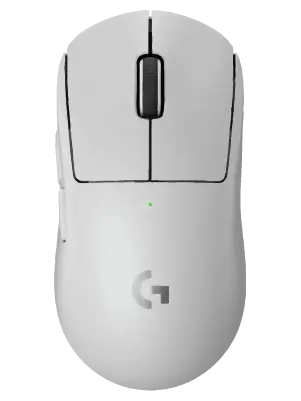
G PRO X 2 SUPERLIGHT 2
Buy this if you play fast-paced competitive games and demand tournament-grade performance.
AmbiEither Hand
Plug & PlayUSB Recv.
Wireless10m Range
Battery12 Months

LOGITECH LIFT VERTICAL
Buy this if you experience wrist strain or discomfort. Handshake grip promotes natural posture.
Ergo Angle57° Wrist Relief
SmartWheelLine vs. Speed
Dual ConnectBLE & Logi Bolt
BatteryUp to 24 Mos

LOGITECH MX MASTER 3S
Buy this if you are a programmer, editor, or designer working seamlessly across multiple computers.
MagSpeed1000 Lines/s
8K SensorOn Glass
Quiet Clicks90% Quieter
Easy-Switch3 Devices
What to Look For in a Logitech Wireless Mouse
Choosing the right mouse comes down to how you spend your day at the desk. While every model in our comparison grid delivers rock-solid wireless connectivity, a few key factors can help narrow down your choice:
- Ergonomics and Shape: If you work long hours and experience wrist strain, an ergonomic or vertical mouse like the Logitech Lift alters your hand position to reduce muscle fatigue. For quick, casual everyday use, standard symmetric shapes like the Logitech M171 are lightweight and highly portable.
- Connectivity Options: Logitech uses two primary wireless methods. The traditional 2.4GHz USB receiver offers a plug-and-play experience with zero lag. Higher-end models also include Bluetooth, allowing you to pair the mouse with multiple devices—like a laptop and a tablet—and switch between them with a single click.
- Sensor Precision: If you are editing high-resolution photos, coding, or playing competitive esports, sensor accuracy matters. Look for models featuring high DPI counts or specialized sensors (like the HERO sensor) for pixel-perfect tracking.
Frequently Asked Questions
Which Logitech wireless mouse has the longest battery life?
For pure battery longevity, simple everyday mice like the Logitech M171 and M220 are incredibly efficient, often lasting up to 12 to 18 months on a single AA battery. Professional models like the MX Master 3S use rechargeable internal batteries that give you months of use on a single charge via USB-C.
What is the benefit of a silent mouse?
Mice like the Logitech M220 feature specialized switch dampeners that reduce clicking noise by up to 90%. This makes them ideal for quiet office environments, library study sessions, or shared workspaces where constant clicking might be a distraction.
Can I use a Logitech wireless mouse without a USB receiver?
Yes, provided the mouse features built-in Bluetooth connectivity (such as the Signature M650 or MX Master 3S). This allows you to connect directly to your laptop’s internal Bluetooth chip, keeping your USB ports free.
Need more choices? Visit our Relviq Home Page to browse our full collection. You can also explore our top budget picks in the Best Mouse for Students guide, or check out our master Best Wireless Mouse roundup. We make it easy to find the right Logitech wireless mouse for your desk setup.