
VS BATTLE: CHOOSE YOUR PRODUCTIVITY KEYBOARD
Logitech Pebble Keys 2 K380s vs Logitech K295: Features Breakdown
Finding the right keyboard can completely change how your workday feels. If you are trying to choose between the Logitech Pebble Keys 2 K380s vs Logitech K295, it really comes down to what you need on your desk every day. We look at how the ultra-portable, multi-device agility of the Pebble series compares to the simple, full-sized silent design of the K295 line so you can choose the best one for you.
Check out the full details on the Official Logitech Website.
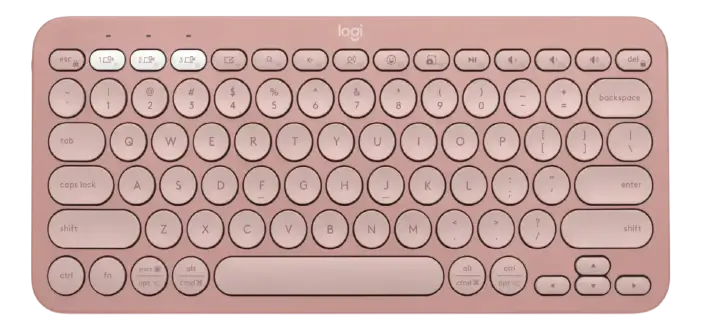
LOGITECH PEBBLE KEYS K380S
BATTERY LIFE:
UP TO 36 MONTHS (2xAAA)

TYPING FEEL:
SLIM, LAPTOP-LIKE SCOOPED KEYS
$$ COMPACT PORTABLE VALUE
V S
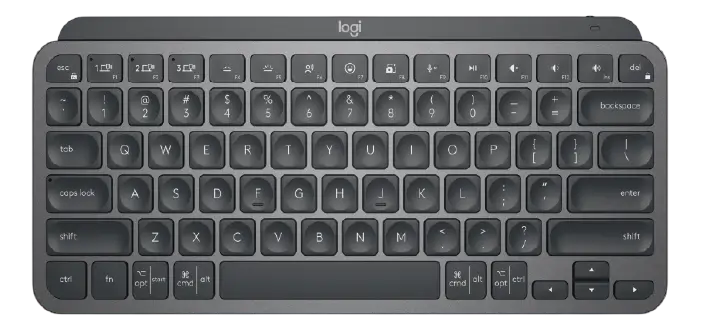
Logitech K295 Silent

SILENTTOUCH:
90% LESS TYPING NOISE

POWER:
UP TO 24 MONTHS (2xAAA)
$ BUDGET OFFICE CLASSIC
When diving into a direct Logitech Pebble Keys 2 K380s vs Logitech K295 matchup, the first major difference lies in the design philosophy and the type of work environment each keyboard is built to serve. The Logitech Pebble Keys 2 K380s is engineered for modern, on-the-go productivity and minimalist aesthetics. It features an ultra-compact, tenkeyless layout with distinct circular keys that give it a playful yet highly professional vibe. The low-profile, chiclet-style switches mimic a high-end modern laptop, offering a snappy and responsive typing experience that lets you breeze through notes in a coffee shop or draft reports on a tight desk space. Deciding on the Logitech Pebble Keys 2 K380s vs Logitech K295 comes down to choosing between ultimate portability and a traditional desktop layout. This lightweight build acts as a stylish, travel-friendly companion for multi-device users who want to turn any surface into an efficient, clutter-free workspace.
- Form & Build: Ultra-compact, lightweight, tenkeyless layout made with high-quality recycled plastic.
- Typing Experience: Low-profile, circular chiclet keys with a snappy, quiet, and modern laptop feel.
- Illumination: No key backlighting—optimized for extreme energy efficiency and minimalist portability.
- Power Source: Powered by 2x AAA batteries, boasting an impressive 36-month battery life.
- Connectivity: Connects via Bluetooth Low Energy or Logi Bolt USB receiver across 3 paired devices.
- Software & Macros: Supports customized App-Specific shortcuts and Fn-key remapping via Logi Options+.
- Best For: Students, remote workers, and minimalists who prioritize portability and multi-device switching.
Beyond the physical aesthetic, analyzing the Logitech Pebble Keys 2 K380s vs Logitech K295 features reveals distinct differences in layout familiarity and noise management. The Logitech K295 is designed as a steadfast, full-sized desktop workhorse, built to handle long hours of traditional office tasks without drawing attention to itself. Equipped with SilentTouch technology, it eliminates over 90% of typing noise while maintaining the deep, satisfying travel of a classic membrane keyboard. From the dedicated number pad to the instant-access media hotkeys spanning the top, the layout emphasizes absolute efficiency for spreadsheet management, data entry, and traditional desktop setups. If your daily workflow requires a permanent, dependable desk companion that keeps your environment completely quiet, exploring the Logitech Pebble Keys 2 K380s vs Logitech K295 dynamic makes it clear that the full-sized utility and spill-resistant durability of the K295 are tailored for reliable, distraction-free office production.
- Form & Build: Full-sized layout with an integrated number pad and durable, spill-resistant design.
- Typing Experience: Traditional deep-travel membrane keys featuring SilentTouch technology for near-silent typing.
- Illumination: No key backlighting—focused on simple, long-lasting utility.
- Power Source: Powered by 2x AAA batteries, providing a worry-free 24-month lifespan with an on/off switch.
- Connectivity: Reliable, lag-free 2.4 GHz wireless via a plug-and-forget Unifying or standard USB receiver.
- Software & Macros: Plug-and-play simplicity with 8 dedicated hotkeys for instant media and shortcut control.
- Best For: Office professionals and data entry clerks who need a full-sized, quiet, and traditional typing setup.
Looking for more options before you decide? Head over to our Relviq Home Page to discover our complete collection of expert hardware breakdowns. If you want to expand your search beyond this Logitech Pebble Keys 2 K380s vs Logitech K295 matchup, dive into our curated Best Keyboards for Typing guide to see how these models rank against other heavy hitters, or explore the ultimate Best Quiet Keyboards roundup to find the most whisper-quiet switches. We make it simple to track down the ideal Logitech wireless keyboard to perfectly match your workflow and desk setup.