
VS BATTLE: CHOOSE YOUR PRODUCTIVITY MOUSE
Logitech MX Master 3S vs Logitech Lift Vertical: Features Breakdown
Finding the right mouse can completely transform your daily workflow and save you from wrist strain. If you are diving into a Logitech MX Master vs Logitech Lift Vertical comparison, it really comes down to whether you prioritize ultimate performance control or a natural, pain-free wrist posture. We look at how the uniquely angled designs and features stack up in this Logitech MX Master vs Logitech Lift Vertical matchup so you can choose the best one for your desk setup.
Check out the full details on the Official Logitech website.
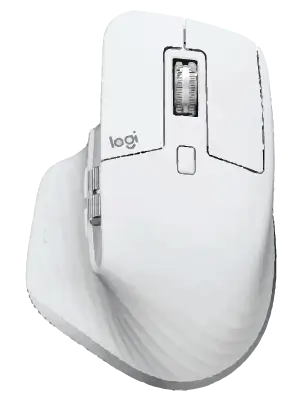
Logitech MX Master 3S

BATTERY LIFE:
UP TO 70 DAYS (RECHARGEABLE USB-C)

CLICK FEEL:
ULTRA-QUIET, TACTILE CLICKS
$$ PREMIUM POWERHOUSE
VS
Logitech Lift Vertical

BATTERY LIFE:
UP TO 24 MONTHS (1x AA BATTERY)
CLICK FEEL:
SILENT, ERGONOMIC 57° ANGLE
$$ ERGO COMFORT
When diving into a direct Logitech MX Master vs Logitech Lift Vertical matchup, the first major difference lies in the design philosophy and the scale of execution. The Logitech MX Master 3S is engineered as a heavy-duty productivity powerhouse, specifically built for power users, creators, and developers who need instant control over complex timelines and large spreadsheets. It features a traditional flat layout but includes a sculpted thumb rest that naturally supports your hand. The standout feature is its MagSpeed Electromagnetic scroll wheel, which allows you to fly through 1,000 lines in a second with absolute precision. Designed for medium-to-large hands, it excels at providing customized macro control right at your fingertips. If you analyze the core details of this Logitech MX Master vs Logitech Lift Vertical showdown, it becomes clear that performance vs posture is the true deciding factor.
- Form & Build: Large, premium sculpted right-handed design featuring a thumb rest with an integrated gesture button.
- Scrolling Experience: Premium MagSpeed electromagnetic wheel with infinite scrolling plus an additional thumb wheel for horizontal navigation.
- Tracking Precision: High-precision 8,000 DPI sensor that tracks seamlessly on almost any surface, including glass.
- Power Source: Recharges quickly via an included USB-C cable, lasting up to 70 days on a single charge.
- Connectivity: Seamless multi-device pairing up to 3 devices via Bluetooth Low Energy or the secure Logi Bolt USB receiver.
- Software & Macros: Highly customizable via Logi Options+ software, offering 7 deeply programmable buttons.
- Best For: Power users, video editors, coders, and professionals who prioritize macro speed and multi-screen workflows.
Beyond the traditional flat aesthetic, looking at a Logitech MX Master vs Logitech Lift Vertical comparison reveals distinct differences focused squarely on skeletal health and joint alignment. The Logitech Lift is designed explicitly as an ergonomic solution to minimize forearm strain and wrist pain during long hours at the desk. Shaped with a striking 57-degree vertical tilt, it forces your hand into what experts call a natural “handshake position.” This unique angle eliminates the muscle strain caused by twisting your forearm flat over a standard desk. Scaled perfectly for small-to-medium hands, the Lift trades the heavy metal construction of the MX series for a colorful, soft-textured rubberized grip that feels immediately cozy and approachable. Ultimately, choosing a winner in the Logitech MX Master vs Logitech Lift Vertical debate relies heavily on your hand size and comfort needs.
- Form & Build: Compact, 57-degree vertical ergonomic layout designed to reduce muscle fatigue and alleviate wrist pressure.
- Scrolling Experience: Equipped with a SmartWheel that automatically shifts from line-by-line precision to fast scrolling modes.
- Tracking Precision: Reliable Advanced Optical Tracking offering an adjustable DPI range from 400 to 4,000.
- Power Source: Driven by a single AA battery, delivering a massive, worry-free 2-year battery lifespan.
- Connectivity: High-security connection over Bluetooth Low Energy or the included Logi Bolt USB receiver across 3 separate devices.
- Software & Macros: Fully compatible with Logi Options+ for custom app profiles across its 6 tactile, silent-click buttons.
- Best For: Individuals with small-to-medium hands experiencing wrist discomfort who want an approachable, ergonomic daily driver.
Looking for more options before you decide on the ultimate Logitech MX Master vs Logitech Lift Vertical winner? Head over to our Relviq Home Page to discover our complete collection of expert hardware breakdowns. If you want to expand your search beyond this Logitech MX Master vs Logitech Lift Vertical matchup, dive into our curated Best Mice for Productivity guide to see how these models rank against other heavy hitters, or explore the ultimate Best Ergonomic Mice roundup to find the most comfortable options. We make it simple to track down the ideal Logitech wireless peripheral to perfectly match your workflow and desk setup.