
VS BATTLE: CHOOSE YOUR PRODUCTIVITY KEYBOARD
Logitech Wave Keys vs Logitech Signature Slim K950: Features Breakdown
Finding the right keyboard can completely change how your workday feels. If you are trying to choose between the Logitech Wave Keys vs Signature Slim K950, it really comes down to whether you prioritize ergonomic wrist support or a sleek, traditional desktop aesthetic. We look at how the curved, cushioned design of the Wave series compares to the ultra-slim, flat, laptop-style keys of the Signature line so you can choose the best one for you.
Check out the full details on the Official Logitech website.
Logitech Wave Keys
BATTERY LIFE:
UP TO 36 MONTHS (2XAAA)

TYPING FEEL:
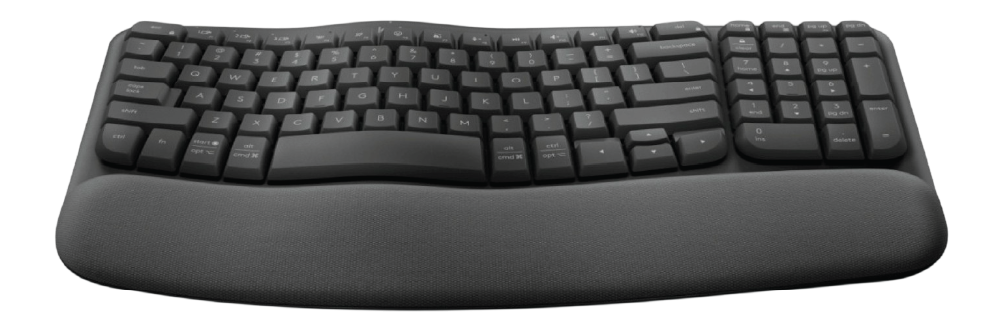
ERGONOMIC, CUSHIONED WAVE
$$ ERGONOMIC COMFORT
VS
Logitech Signature Slim K950
BATTERY LIFE:
UP TO 36 MONTHS (2XAAA)

TYPING FEEL:
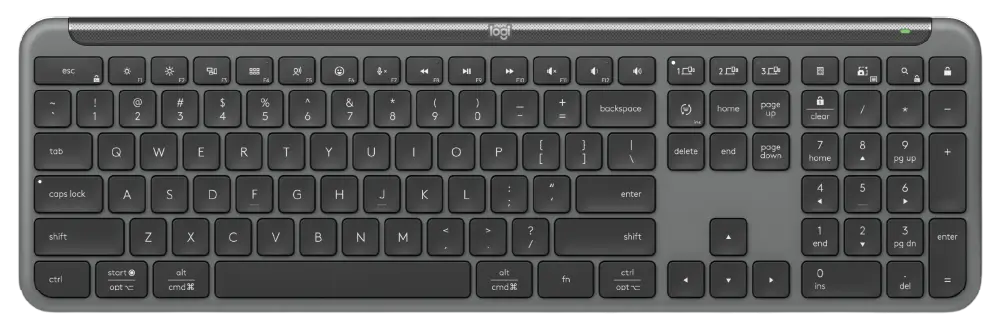
SLIM, LAPTOP-LIKE KEYS
$$ SLEEK PRODUCTIVITY
When diving into a direct Logitech Wave Keys vs Logitech Signature Slim K950 matchup, the first major difference lies in the design philosophy and the type of work environment each keyboard is built to serve. The Logitech Wave Keys is engineered for modern, health-conscious productivity and maximum typing comfort during long hours at the desk. It features a unique, scientifically tested curved layout combined with an integrated, three-layer cushioned palm rest that naturally aligns your hands and reduces forearm strain. Despite its entry-level ergonomic form factor, it manages to compress a full typing experience into a space-saving footprint, offering a short, gentle membrane typing feel that feels approachable from day one. Deciding on the Logitech Wave Keys vs Logitech Signature Slim K950 comes down to choosing between specialized ergonomic relief and a traditional desktop layout. This wave-shaped build acts as a comforting, body-friendly companion for users who want to eliminate wrist fatigue without sacrificing a numpad or navigating a steep learning curve.
- Form & Build: Compact 96% layout featuring an scientifically certified wave design and an integrated memory-foam cushioned wrist rest.
- Typing Experience: Gentle-press, low-profile rubber membrane keys that provide a smooth, highly muted clack with zero finger strain.
- Illumination: No key backlighting—completely optimized to draw minimal power for long-term usage.
- Power Source: Runs reliably on 2x AAA batteries, providing an exceptional lifespan of up to 36 months.
- Connectivity: Seamless wireless pairing via Bluetooth Low Energy or the secure Logi Bolt USB receiver for up to 3 devices.
- Software & Macros: Fully compatible with Logi Options+ software to trigger automated Smart Actions and custom shortcut maps.
- Best For: Office workers, writers, and students who experience forearm tension and prioritize wrist support and ergonomics.
Beyond the physical aesthetic, analyzing the Logitech Wave Keys vs Logitech Signature Slim K950 features reveals distinct differences in desktop styling and key mechanics. The Logitech Signature Slim K950 is designed as a sleek, premium, full-sized desktop powerhouse built to mimic high-end laptop layouts for swift office execution. Equipped with scissor-actuated switches beneath the keys, it delivers a very snappy, tactile, and highly responsive feedback loop that lets you cruise through high-speed data entry. From its premium, flat chassis profile to the inclusion of adjustable tilt legs, the design emphasizes minimalist elegance and traditional layout familiarity on a flat plane. If your daily workflow requires a streamlined desk layout that looks professional while keeping typing completely silent, exploring the Logitech Wave Keys vs Logitech Signature Slim K950 dynamic makes it clear that the snappy laptop feel and full-size precision of the K950 are tailored for pure speed and traditional office efficiency.
- Form & Build: Ultra-thin, full-sized 100% layout built with recycled materials and retractable tilt legs for variable typing angles.
- Typing Experience: Laptop-style scissor switches with slightly indented keycaps providing a crisp, quiet, and fast tactile response.
- Illumination: No key backlighting—focusing entirely on a clean professional look and strict power management.
- Power Source: Powered by 2x AAA batteries, delivering a massive, worry-free 36-month battery duration.
- Connectivity: High-security connection over Bluetooth 5.1 or the included Logi Bolt USB receiver across 3 separate devices.
- Software & Macros: Supports custom App-Specific F-key profiles and time-saving Smart Actions macro triggers via Logi Options+.
- Best For: Professionals, remote workers, and spreadsheet users who love laptop typing profiles and need an ultra-quiet, traditional layout.
Looking for more options before you decide? Head over to our Relviq Home Page to discover our complete collection of expert hardware breakdowns. If you want to expand your search beyond this Logitech Wave Keys vs Logitech Signature Slim K950 matchup, dive into our curated Best Keyboards for Typing guide to see how these models rank against other heavy hitters, or explore the ultimate Best Quiet Keyboards roundup to find the most whisper-quiet switches. We make it simple to track down the ideal Logitech wireless keyboard to perfectly match your workflow and desk setup.