
VS BATTLE: CHOOSE YOUR PRODUCTIVITY KEYBOARD
Logitech Signature Slim K950 vs Logitech MX Keys S: Features Breakdown
Finding the right keyboard can completely change how your workday feels. If you are trying to choose between the Logitech K950 vs MX Keys S, it really comes down to what you need on your desk every day. We look at how the high-end feel and glowing keys of the MX series compare to the simple, practical design of the Signature line so you can choose the best one for you.
Check out the full details on the Official Logitech Website.
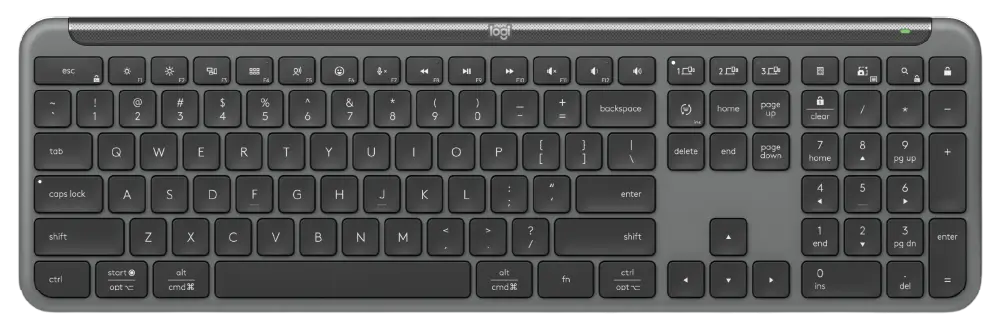
LOGITECH SIGNATURE SLIM K950
BATTERY LIFE:
UP TO 36 MONTHS (2XAAA)

TYPING FEEL:
SLIM, LAPTOP-LIKE KEYS
$$ MID-RANGE VALUE
VS
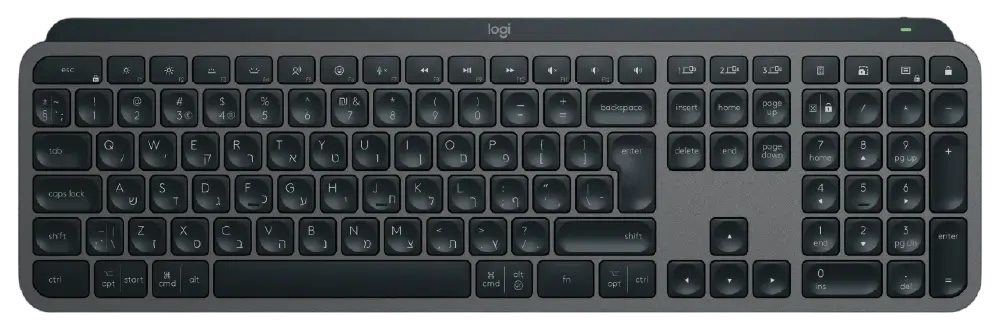
LOGITECH MX KEYS S

SMART BACKLIGHTING:
AUTO ADJUSTS

POWER:
USB-C RECHARGEABLE
$$$ PREMIUM INVESTMENT
When diving into a direct Logitech K950 vs MX Keys S matchup, the first major difference lies in the build philosophy and how a keyboard feels beneath your fingertips. The Logitech Signature Slim K950 is built as a lightweight, practical everyday companion. It features a high-quality plastic chassis that keeps it slim and portable while retaining a traditional laptop-like typing feel. The keys are crisp, tactile, and offer a comfortable travel distance that makes typing out long emails or managing data spreadsheets completely effortless. Deciding on the Logitech K950 vs MX Keys S comes down to balancing simplicity against heavy-duty hardware. This slim layout serves as an incredibly durable workstation baseline for minimal desk setups, making it perfect for budget-conscious professionals who want a reliable tool without sacrificing workspace aesthetics or layout functionality.
- Form & Build: Ultra-slim, lightweight layout with a high-quality, eco-friendly plastic chassis.
- Typing Experience: Crisp, tactile, laptop-like keys with a familiar membrane feel.
- Illumination: No key backlighting—designed entirely to maximize battery life.
- Power Source: Powered by 2x AAA batteries, offering an incredible 36-month lifespan.
- Connectivity: Connects via Bluetooth Low Energy or Logi Bolt USB receiver across 3 devices.
- Software & Macros: Supports basic key remapping and shortcuts via Logi Options+.
- Best For: Professionals wanting a quiet, low-maintenance, and budget-friendly daily driver.
Beyond the physical aesthetic, analyzing the Logitech K950 vs MX Keys S features reveals distinct differences in premium capabilities and power management. The Logitech MX Keys S represents the absolute peak of office hardware design. From the moment you place your hands on its solid metal plate base, the premium craftsmanship stands out. The key feature is distinct, spherically-dished indentations tailored perfectly to the shape of your fingertips. This unique structural design centers your strokes, drastically reducing typing errors while providing an ultra-fluid, quiet, and satisfying tactile response. If your daily workflow demands hours of intensive typing or coding, exploring the Logitech K950 vs MX Keys S dynamic makes it clear that the premium stability and luxury engineering of the MX series are built to withstand years of rigorous, continuous project execution at an elevated creative standard.
- Form & Build: Heavy-duty, premium build featuring a solid metal plate base for zero deck flex.
- Typing Experience: Spherically-dished keys shaped for your fingertips, providing a fluid, ultra-precise response.
- Illumination: Smart proximity backlighting that automatically glows as your hands approach and adapts to room light.
- Power Source: Internal USB-C rechargeable battery lasting up to 10 days (backlight on) or 5 months (backlight off).
- Connectivity: Connects via Bluetooth or Logi Bolt with physical, dedicated Easy-Switch keys.
- Software & Macros: Supports advanced automation, complex macros, and Smart Actions via Logi Options+.
- Best For: Power users, programmers, and designers who need maximum tactile precision and heavy multitasking.
Looking for more options before you decide? Head over to our Relviq Home Page to discover our complete collection of expert hardware breakdowns. If you want to expand your search beyond this Logitech K950 vs MX Keys S matchup, dive into our curated Best Keyboards for Typing guide to see how these models rank against other heavy hitters, or explore the ultimate Best Quiet Keyboards roundup to find the most whisper-quiet switches. We make it simple to track down the ideal Logitech wireless keyboard to perfectly match your workflow and desk setup.