
Logitech M170 vs M171 vs M185 vs M220 vs M235:
The Ultimate Budget Wireless Mouse Guide
When setting up a productive home office, assembling a student desk, or packing a laptop bag for remote work, finding a reliable pointing device is essential. In the world of affordable computer accessories, Logitech consistently stands out for producing hardware that works flawlessly without any fuss. However, looking through their entry-level catalog can quickly become confusing for a shopper.
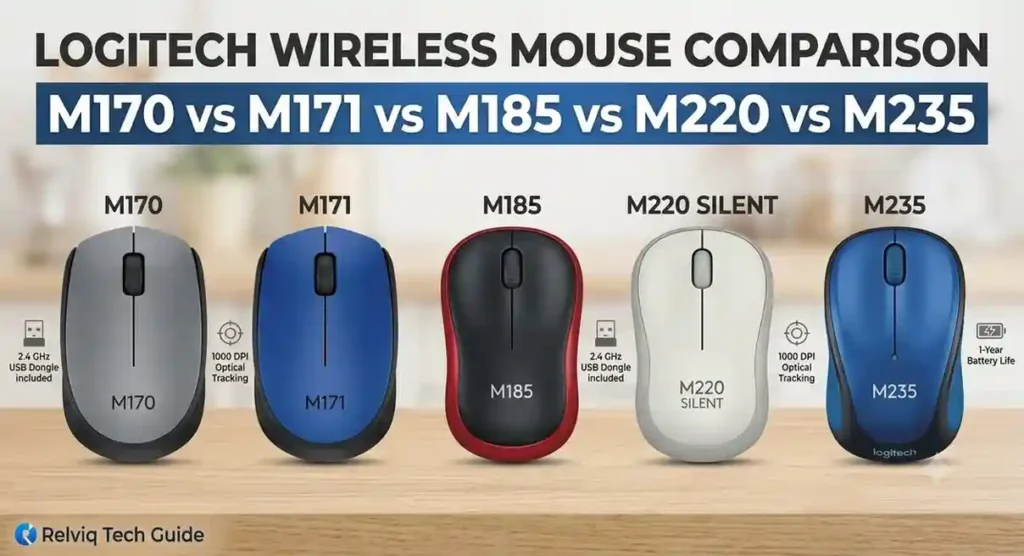
When browsing online listings, you will find a handful of compact mice that look almost identical at first glance. They feature similar dimensions, plug into your computer using the exact same tiny USB dongle, and sit at very close price points. Yet, a deeper dive into the Logitech M170 vs M171 vs M185 vs M220 vs M235 family reveals that these five models are tailored for completely different daily computing habits, hand postures, and work environments.
Choosing the wrong mouse might feel like a minor tech misstep, but using an ill-fitting tool for hours can cause hand cramps, wrist fatigue, or a noisy clicking distraction in a quiet room. This comprehensive guide breaks down the differences in body contours, internal button switches, tracking sensors, and structural weights so you can pick the exact right tool for your setup.
⚙️ The Shared Hardware Baseline
Before exploring what makes each individual model unique, it is helpful to establish the common foundation they all share. Logitech uses a highly reliable, standardized hardware baseline across this entire budget class to ensure a great user experience.
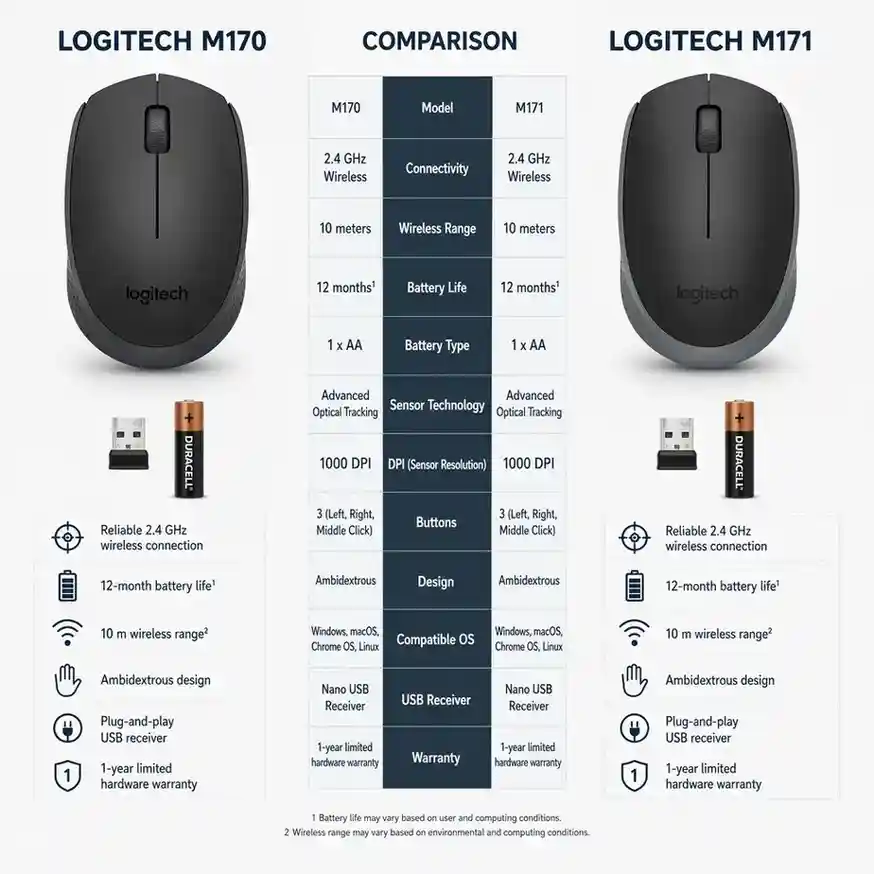
Every mouse on this list connects to your computer using a physical, ultra-compact 2.4 GHz USB nano receiver. This small dongle is safely tucked away inside the battery compartment when you first unbox the device. To set it up, you simply pull the receiver out, plug it into an open USB-A port on your machine, and flip the power switch on. There are no complicated Bluetooth pairing screens, no PIN codes to enter, and absolutely no custom drivers or software packages to install. It works instantly across Windows, macOS, ChromeOS, and Linux systems.
The wireless chip built into these devices provides a stable operating radius of up to 33 feet, which is roughly 10 meters. This ensures a drop-free connection even if your computer tower is tucked away under a heavy wooden desk or you are using the mouse to navigate presentation slides from across a room.
Additionally, the optical tracking performance across all five options is locked at a fixed resolution of 1000 DPI (dots per inch). This tracking speed serves as an excellent sweet spot for standard office displays and high-definition laptop screens, allowing you to glide smoothly across the screen without needing to make wide, tiring arm movements.
Power efficiency is another major engineering strength across this essential collection. Each device runs on just one standard, non-rechargeable AA battery. To maximize battery life, the mice feature an integrated, automated smart-sleep protocol. The moment you leave your desk and the mouse sits completely idle for a few minutes, it automatically drops down into a low-power standby mode. The second you slide it across your desk, it wakes up instantly without any cursor stutter. A physical on-and-off power switch on the base also allows you to shut down the hardware completely when packing up your bag.
For technical support or to verify firmware details regarding these baseline receiver technologies, you can check the documentation directly on the Logitech Official Website.
🔍 Comprehensive Breakdown of Individual Models
To see the value progression through this product ecosystem, we need to look closely at how the shape, texture, and internal micro-switches change as you move from the baseline essentials up to the premium daily drivers.
🧱 The Baseline Options: M170 and M171
The M170 and M171 serve as the entry points for Logitech’s budget wireless ecosystem. They are designed for straightforward, dependable functionality without any unnecessary cosmetic extras. Internally, these two mice are the exact same machine. They share the identical tracking sensor, the same circuit board, and the exact same dimensions.
Logitech uses two separate model numbers primarily to target different retail store channels and to offer distinct visual styling options. Both versions feature a low-profile, flat, and perfectly mirrored chassis. Because the left and right flanks are shaped identically, these mice are fully ambidextrous, allowing left-handed and right-handed individuals to navigate with equal ease.
The main difference between them comes down to surface aesthetics. The M170 is styled for minimalist, traditional workspaces, featuring a uniform matte charcoal plastic finish across the entire shell. The M171 is designed for users who want to bring a bit of personal style to their desk, adding high-contrast color tracks—such as bright blue or vibrant red—along the outer edges of the body.
The entire outer housing consists of hard, lightly textured plastic. The main left and right buttons rely on classic mechanical switches that deliver a sharp, highly tactile feel accompanied by a crisp, distinctly audible clicking sound. For standard office tasks, you can expect roughly 12 months of daily use before needing to replace the AA battery.
📐 The Ergonomic Curve: M185
The M185 represents the first major design shift in this lineup. While it maintains an incredibly accessible price point similar to the entry-tier models, it introduces a completely different physical structure that alters how the mouse supports your hand.
Instead of the flat, straight lines seen on the M170 series, the M185 features a gently curved, contoured body. The rear section of the mouse slopes higher into the air to fill out and support the natural arch of your palm, while the left and right sides scoop inward to create a comfortable resting place for your thumb and fingers. Even with these extra contours, the shape remains perfectly symmetrical, meaning it preserves its ambidextrous usability for both left- and right-handed users.
That extra vertical height means your hand stays in a much more relaxed, natural position. This makes the M185 a far better option if you spend long hours scrolling through documents, managing large spreadsheets, or doing online research. If your daily routine consists of heavy academic workloads, you can see how this structural upgrade stack up by checking out our Best Mouse for Students in 2026 roundup.
The outer body uses a smooth, durable plastic finish that holds up well against surface wear over time. Like the baseline models, it relies on standard mechanical switches, giving you that familiar, clicky feedback every time you press a button, along with a dependable 12-month battery lifespan.
🤫 The Whisper-Quiet Workspace Standard: M220 Silent
The M220 Silent is incredibly popular for a very clear reason: it completely eliminates distracting click noises from your workspace. Physically, it shares the exact same comfortable, contoured dimensions, light weight, and ambidextrous shape as the M185, but its internal components are highly upgraded.
The standout feature here is Logitech’s SilentTouch technology. The engineering team replaced the noisy mechanical switches under the primary buttons with custom, dampened micro-switches. This reduces clicking noises by over 90% while still preserving a solid, tactile sensation beneath your fingertips so you know when a press has registered. The central scroll wheel is also treated with a soft rubber coating and an internal dampening mechanism to keep scrolling completely silent.
Along with the quiet switches, the M220 includes a highly efficient internal controller. While the previous models on this list run for a year on a single battery, the M220 stretches its power management to an impressive 18 months of typical daily use. Because it is nearly noiseless, the M220 is the ultimate choice for university students working in silent libraries, remote professionals working from home late at night without waking family members, or anyone sitting in a quiet, open-plan corporate office.
⭐ The Premium Essential: M235
Positioned at the top of this essential lineup, the M235 is engineered as a primary input tool for full-time professionals who spend eight or more hours a day at a desk and require premium materials.
While every other mouse discussed so far features an exterior made entirely of hard plastic, the M235 integrates soft, patterned rubber grips into the side contours where your fingers rest. This rubber molding provides an excellent cushion, increases tactile control, and prevents your fingers from slipping if your hands get warm during an intense project.
The tracking technology also gets a major upgrade. Standard budget mice use a basic optical sensor that can skip, jitter, or stop responding entirely when placed on slick, shiny plastic or heavily grained wood surfaces. The M235 uses Logitech’s Advanced Optical Tracking system, which utilizes a modified lens angle to read incredibly fine surface details. This allows it to glide smoothly over surfaces that leave other budget sensors stuttering.
The M235 is also slightly longer and noticeably heavier than the other four options. This extra physical presence gives it a grounded, highly durable feel that offers the best hand and wrist support of the entire collection. It utilizes traditional mechanical buttons for clear click feedback and delivers a solid 12 months of battery life.
📏 Physical Handling, Sizes, and Weight
To understand how these different models compare in real-world use, we need to look closely at their physical footprints. Small variations in millimeters and grams make a massive difference when an object spends all day resting beneath your hand.
🗺️ Footprint and Physical Dimensions
The M170 and M171 occupy the most compact footprint in the group, measuring 97.7 mm long and 35.2 mm tall. This exceptionally low profile makes them incredibly easy to pack away into a tight laptop sleeve or a small accessory pocket without creating an awkward bulge.
The M185 and M220 occupy the middle tier. They are slightly narrower across the sides but grow to 99.0 mm long and 39.0 mm tall. That extra height is precisely what gives your hand a fuller, more supported feel, shifting your hand away from a cramped claw position.
The M235 stands out as the largest model, measuring 102.0 mm in length. The extra elongation allows your fingers to stretch out naturally along the primary buttons, making it the most comfortable option for individuals with medium to large hands.
⚖️ Weight Variations
Weight directly affects tracking control and wrist fatigue over a long workday. The M170 and M171 are the lightest options, coming in at just 70.5 grams with the AA battery installed. They feel almost weightless, allowing for swift movements across a mousepad with minimal effort.
The M185 and M220 weigh 75.2 grams, providing a highly balanced feel that feels substantial on a desk without being tiring.
The M235 is the heaviest model at 84.0 grams. The extra weight comes from its thicker construction materials, reinforced internal frame, and heavy rubber side moldings, giving it a premium feel during daily navigation tasks.
🏁 Final Decision: Finding Your Ideal Match
When deciding between the models in this lineup, you shouldn’t worry too much about price, as they all sit very close to one another. Instead, look closely at your personal work environment and choose the tool that fits your daily habits.
By evaluating your personal desk habits against this complete Logitech M170 vs M171 vs M185 vs M220 vs M235 comparison, you can easily pick the exact features that match your environment:
- 🎒 Go with the M170 or M171 for basic, ultra-portable travel utility.
- 🤝 Choose the M185 if you want classic mechanical clicks paired with enhanced palm support.
- 🤫 Opt for the M220 Silent if you need to eliminate clicking noises entirely for a shared or quiet room.
- 🏆 Finally, invest in the M235 if you want a robust professional tool equipped with cushioned rubber side grips and advanced surface tracking capabilities.
For an even broader perspective on upgrading your daily setup with highly efficient peripheral configurations, be sure to view our curated ranking of the
Best Wireless Mouse for Work and Study
&
Relviq Tech Home page also.
&
HP 240 Bluetooth Mouse Receiver Review.